Assetto Corsa Competizione · Closed beta
Your race engineer, on the radio.
It calls out what changes on its own and answers what you ask through a wheel button: fuel, gaps, who is around you, tyre pressures, track temperature. Running entirely on your PC.
The engineer speaks Brazilian Portuguese for now. The clips on this page preview the English voice, which is next on the roadmap.
- You
- Who’s ahead?
- Eng.
- Car ahead, 2.7 seconds. That’s number 51, James Calado.
- Eng.
- You’ve asked for 17 litres at the stop. You need 23.
The engineer
It speaks at the right time, and only then
A preview of the English voice, made with the same voice engine the app uses. Today the engineer speaks Brazilian Portuguese; English is next. The driver’s question was synthesized for the example; in the game, you ask.
- You
- Who’s ahead?
- Eng.
- Car ahead, 2.7 seconds. That’s number 51, James Calado.
- You
- How much fuel do I have?
- Eng.
- 31 litres in the tank. Good for 12 laps. 4 litres to spare at the end.
- Eng.
- You’ve asked for 17 litres at the stop. You need 23.
- Eng.
- Rain expected in ten minutes.
- You
- What’s the track temperature?
- Eng.
- Track is 28 degrees, air 20.
- You
- What pressure should I run?
- Eng.
- Over the last 4 laps, hot average was 26.5 front and 26.8 rear. For 27.5, go up 1.0 at the front, 10 clicks, and 0.7 at the rear, 7 clicks.
Calls it out unasked
An engineer who repeats himself teaches the driver to ignore him. Each call describes a situation and only comes back when it really changes.
Fuel
When the tank won’t make the finish, and how many litres short.
Rain
Rain expected in ten minutes, and when it will stop.
Pit dialled wrong
Too little fuel on the MFD, or dry tyres with rain coming.
Brakes
Discs over the limit, on one corner or all four.
Pressure
Tyres out of the window, only once they’re up to temperature.
Car behind
Someone within a second of your gearbox.
Answers through the wheel
Hold the button, ask, release. It answers in ~1.5 s. Without the data, it says so; it never makes up a number.
Other cars
It knows who’s around you
Through the game’s Broadcasting API it follows the whole grid: your position, the car ahead and the car behind, with number, name and the gap in seconds on track.
0.08 s
Median difference between the gap the app computes and the game’s own, in a test race.
Online
Online, the game publishes gaps as zero or frozen. The app computes its own and ignores the game’s.
On track, not on the timing screen
The official position takes up to 40 s to flip after an overtake. “Car ahead” is the one physically ahead of you right now, like the game’s relative.
Overlays
On screen, only what the dash doesn’t show
No speed, gear or RPM: the car already shows that. Every widget can be toggled and dragged wherever you want.

Timing
Sectors, delta, best lap and theoretical lap, with the current sector highlighted.
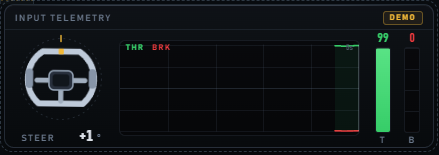
Inputs
Steering, throttle and brake, with the last 5 seconds of history.
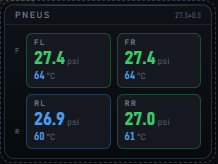
Tyres
Pressure coloured by the operating window, and core temperature.

Weather
Track condition and the rain forecast now, in 10 and in 30 minutes.
Plus fuel (consumption, laps left and how much you need to finish), brake temperatures, brake bias and the Radio, showing what the engineer heard and answered. Screenshots of the app with sample data.
Pricing
The Driver plan is free during the beta
From the engineer who only calls things out, to the one who answers, sees the whole race and, soon, talks with AI. During the closed beta, the Driver plan is free; the other plans arrive at launch.
Free
To get to know it
forever
Join the beta- ✓Overlays: timing, inputs, tyres, brakes, weather and fuel
- ✓Local telemetry, no account
Driver
Free in the betaThe engineer who calls it out
billed $79 yearly-18%
Join the beta- ✓Everything in Free
- ✓Voice alerts: fuel, rain, brakes, pressure, car behind and pit dialled wrong
- ✓Per-lap history
- ✓Loaded setup detection
Engineer
The engineer who answers
billed $199 yearly-17%
Join the beta- ✓Everything in Driver
- ✓Radio through a wheel button: fuel, gaps, position, sectors, pressures, track, setup
- ✓Other cars: position, gaps and names of who’s ahead and behind
- ✓Pit stop check against the MFD
- ✓Cold pressure suggestion from your own history
Coming soon
Free-form radio conversation, with AI · Race strategy: stops, stints, fuel
Pro
The complete engineer, who knows you
billed $349 yearly-17%
Join the beta- ✓Everything in Engineer, with every new feature before the other plans
Pro only
- ★Early access to every new feature
- ★Priority support
- ★A vote on what goes into the roadmap
Coming soon
Free-form radio conversation, with AI · Race strategy: stops, stints, fuel · Post-race analysis · Driver memory across races · Progress reports · Other sims
Planned prices, in US dollars, and may change before launch. “Coming soon” items don’t exist in the app yet. Everything with a ✓ runs on your PC; the AI features may need the internet.
Install
Five steps to your first radio call
Windows 10 or 11, 64-bit, with ACC.
- 1
Install
A ~74 MB installer, per Windows user, no admin rights. It isn’t code-signed yet: SmartScreen warns the first time (“More info” → “Run anyway”).
- 2
Play in windowed fullscreen
In ACC, use borderless / windowed fullscreen. In exclusive fullscreen no overlay can draw over the game; the voice works in both.
- 3
Enable the game’s Broadcasting API
It’s what tells the app who’s around you. With the game closed, edit Documents\Assetto Corsa Competizione\Config\broadcasting.json:
{ "updListenerPort": 9000, "connectionPassword": "asd", "commandPassword": "" } - 4
Turn the voice on
In Edit Mode (Ctrl+Alt+E), gear icon → Engineer voice → Speak alerts. The first time, it downloads the voice and speech models, ~820 MB, with progress on the Radio widget. After that, nothing uses the internet.
- 5
Ask through the wheel
Hold the button, wait for the beep, ask, release. For now the button is fixed: the square on a Logitech G29 (code 1). With another wheel, get in touch first.
The installer link isn’t published on this staging site yet. Ask whoever sent you this page for the installer.
For testers
What helps the most right now
These are the parts not yet heard in a real race. Anything odd counts: a wrong answer, a repeated call, a number that doesn’t match the game.
- □Position and car ahead/behind questions, in a full online race
- □“Which setup?” leaving the pits on cold tyres, after loading a saved setup
- □“What pressure should I run?” after three laps in a row without pitting
- □Dial too little fuel on the MFD and wait for the call
- □Pause mid-race and check the fuel maths carries on
- □Whether any alert repeats too much, or stays quiet when it should speak
When reporting, say what you asked (or heard), what you expected, and roughly when in the race. The Radio widget shows what the engineer understood.
FAQ
Before you install
+Does it need the internet?
In the beta, only once, to download the voice models. During a race nothing leaves your PC: voice and recognition run on your CPU. The AI features, when they arrive, may need the internet.
+Does it cost frames?
The voice runs on the CPU and never touches the GPU, which stays for the game. In testing, transcribing a question took ~1.8 s with the game running, with no noticeable FPS drop.
+Does it use AI to answer?
Not yet. In the beta, answers come from rules over the game’s data: it understands the most common questions, and no number is ever made up. The AI engineer, who talks freely, is the next step, on the Engineer and Pro plans. Speech recognition (Whisper) and speech (Kokoro) are already local models.
+Does it work with other sims?
No. For now it’s Assetto Corsa Competizione only, on Windows.
+What about English?
The voice speaks Brazilian Portuguese for now. English is on the roadmap, after the testing period.
+How much does it cost?
During the beta, the Driver plan is free. The other plans, and their prices, arrive at launch: they’re in the Pricing section.
Local
Voice and speech recognition run on your CPU. During a race, nothing leaves your PC. (The AI features, when they arrive, may need the internet.)
No cloud, no account
No login, no server. Your settings and lap history stay on your disk.
The GPU is for the game
The voice never touches your graphics card; it stays entirely for ACC.
Bring the engineer to your next race
Closed beta, with the Driver plan free while testing. Install it, race, and tell us what it got wrong.
Download the beta